
Loan Payment Information
Making a payment has never been easier – and it’s completely secure.
With our convenient Online Loan Payment service, you can quickly pay your Monterra Credit Union loan* (excluding first mortgages) from an account at another financial institution. No more mailing checks or worrying about postal delays, and no extra trips to the branch — just a simple, streamlined payment experience.
Choose one of two convenient ways to make your payment:
Make a one-time payment using a Debit Card or electronic transfer (ACH). To access the payment system, you will need your member number, email address, and the last four digits of your Social Security Number. If you are paying via ACH you will also need your online banking credentials from your other financial institution.
To set up recurring loan payments (or even a one-time), sign into Online Banking. You will have to add and verify your account at your other financial institution, do this in the Transfers widget. You will need the routing and account number from your other financial institution. Once this process is complete, you can schedule recurring or one-time payments to your Monterra Credit Union loans (excluding first mortgages).
Curious how much year to date (YTD) interest you’ve paid on your auto loan?
If you're looking for your year to date (YTD) interest amount, you can easily view your loan rate, interest, and payment details right within your statement. Simply log in to Online Banking for quick access to your eStatement.Go to the eStatements & Notices tab at the top, select Account Statements, and scroll to your auto loan. Just below your auto loan statement, you’ll find a section showing your YTD interest along with other key loan information.
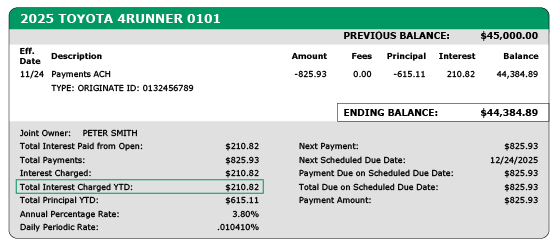
Want to understand whether that interest may qualify for deductions under the One, Big Beautiful Bill Act?
Explore the resources below for helpful guidance or read/download/print our Frequently Asked Questions (FAQs).
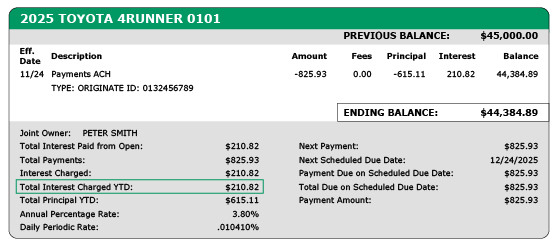
With the recent passage of the One Big Beautiful Bill Act, members may qualify to be able to deduct interest paid on auto loans. The following information is meant as a resource to help you determine whether you qualify.
To qualify for this deduction, you’ll need to meet certain criteria. Visit the IRS webpage and read through the section titled - "No Tax on Car Loan Interest" for guidance on eligibility.
To check whether your new car, truck, or motorcycle purchase qualifies, visit National Highway Traffic Safety Administration’s VIN Decoder website page where you’ll find instructions and the tool you need to verify your vehicle.
Any vehicle owner who is unsure about their eligibility for the auto interest deduction should consult a registered tax advisor.
* Loan payments are available for the following Monterra Credit Union loans: auto, personal, credit card, home equity loan, and home equity line of credit. Principle-only payments are not available.